I Tried to Help AI Read My Website. My Own Firewall Said No.
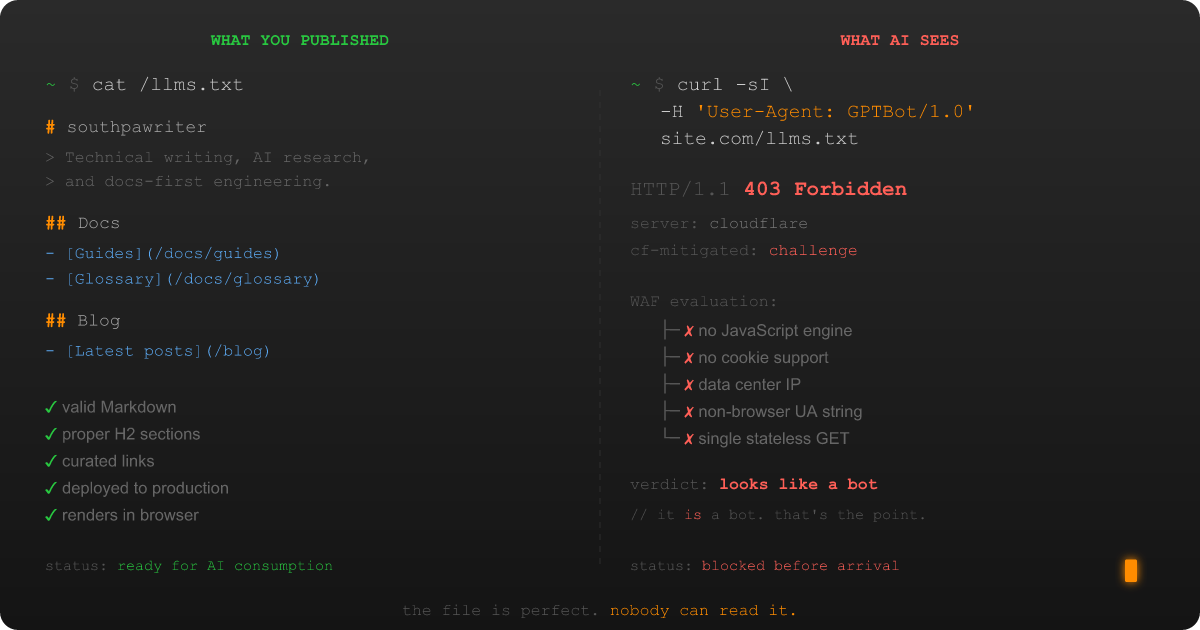

I did everything right. I wrote the file. I followed the spec. I deployed it to production. I even tested it in my browser: clean Markdown rendering, proper H2 sections, curated links with useful descriptions. My llms.txt file was, and I say this without hyperbole, the best piece of structured content I had ever placed at a root URL. I was proud of that file, in the way that only a documentation-first developer can be proud of a Markdown file that nobody has read.
Then an AI system tried to read it, and my own infrastructure said no.
Not a polite "no, sorry, you don't have permission." Not even a helpful "no, that file doesn't exist." The kind of no where Cloudflare intercepts the request before it touches my server, decides the visitor looks suspicious on the basis of (and I love this) being exactly the kind of visitor the file was created for, and serves a JavaScript challenge page instead. To the AI crawler, my lovingly curated Markdown might as well not exist. In its place: a blob of obfuscated HTML designed to prove the visitor is human. Which, by definition, the AI crawler is not. Nor does it aspire to be. That's the entire point.
Welcome to what I've started calling the llms.txt Access Paradox: the structural conflict between publishing content for AI systems and running the security infrastructure that blocks them. It's the kind of problem that makes you close your laptop, open it again, and start writing a research paper instead of just a blog post.
The Setup: Building an llms.txt Tool and Finding a Wall
Some context. I'd been building LlmsTxtKit, a C#/.NET library for parsing, fetching, validating, and caching llms.txt files, and I needed to test it against real-world sites. Not test files I'd written myself. Real sites, with real infrastructure, behind real CDNs and firewalls.
The llms.txt standard is a content discovery format proposed by Jeremy Howard of Answer.AI in September 2024. The premise is elegant: put a Markdown file at /llms.txt on your site that gives AI systems a curated, structured summary of your content. Instead of forcing a language model to parse your entire HTML soup at inference time, you hand it the good stuff on a silver platter. The spec is deliberately minimal: an H1 title, an optional blockquote summary, H2 sections with link lists, and an Optional section for lower-priority content. The canonical Python parser is roughly 20 lines of regex. It's the kind of elegant minimalism that makes a documentation nerd's heart sing. (Mine sang. I'll admit it.)
So I started fetching llms.txt files from sites I knew had them. Anthropic. Cloudflare. Stripe. Vercel. The big names that show up in the community directories.
And the responses started coming back wrong.
What a WAF Block Looks Like When You're Expecting Markdown
When you fetch a well-formed llms.txt file from a site that isn't blocking you, the HTTP response is clean and predictable: a 200 OK with text/markdown content. Here's what that should look like:
And here's what I actually got from a meaningful percentage of sites: a 403 Forbidden, or worse, a 200 that delivers a JavaScript challenge page instead of Markdown:
A 403 Forbidden. And when it wasn't a 403, it was worse: a 200 OK that looked fine at the status code level but delivered a JavaScript challenge page instead of my Markdown. The response body was a wall of obfuscated <script> tags, a <noscript> block telling me to enable JavaScript, and a Cloudflare-branded interstitial designed for a web browser that the AI crawler fundamentally is not.
My tool dutifully parsed this HTML as if it were an llms.txt file and returned garbage. Because from the HTTP layer, everything looked fine. The 200 status code said "here's your content." The content said "prove you're a human first."
How WAFs Block AI Crawlers (The Short Version)
A Web Application Firewall (WAF) is a security layer that sits between the public internet and your web server, inspecting every inbound request to distinguish legitimate visitors from threats. I've since written a comprehensive guide covering the full diagnostic and mitigation workflow for WAF-AI conflicts. If you're dealing with this yourself, start there. But the short version is instructive.
WAFs block real attacks: SQL injection, cross-site scripting, credential stuffing, DDoS floods, and the daily background radiation of bots probing every exposed endpoint on the internet. They are very, very good at their jobs. They are also completely indifferent to yours.
The problem is that AI crawlers look exactly like the threats WAFs are designed to block:
- They don't execute JavaScript. (Neither do SQL injection bots.)
- They don't maintain cookies or session state. (Neither do scraping bots.)
- They originate from data center IP ranges. (So does virtually all malicious traffic.)
- They use non-browser user agents like
GPTBot/1.0orClaudeBot/1.0. (At least they're honest about it. The WAF punishes the honesty.) - They make a single stateless GET request and vanish. (To the WAF, this looks like a surgical strike, not a browsing session.)
Each signal individually might not trigger a block. Together, they're a neon sign that reads "I AM NOT A HUMAN AND I'M NOT EVEN TRYING TO PRETEND." Which, to be fair, is refreshingly honest in an age of sophisticated impersonation. The WAF does not reward honesty.
And here's the paradox: the site owner who put that llms.txt file at their root wants these visitors. They created the file for these visitors. But their own infrastructure (infrastructure they're running because they have to, because the internet is a hostile environment) can't distinguish between "AI system reading my curated content as intended" and "malicious bot probing my endpoints for vulnerabilities."
The Invisible Failure: Why Most Site Operators Never Notice
The most consequential aspect of the llms.txt Access Paradox is that the failure mode is invisible to the people who could fix it.
When Cloudflare blocks an AI crawler from reading your llms.txt, it doesn't send you an email. It doesn't generate an alert. It doesn't pop up a notification saying "Hey, we prevented ClaudeBot from reading the file you specifically published for ClaudeBot." The block shows up in your Security Events dashboard, if you know where to look and if you're the kind of person who regularly reviews WAF logs for blocked requests to a Markdown file. Most site operators aren't. Why would they be?
So the file sits there. It's technically online. You can read it in your browser. If someone asks "do you have an llms.txt?" you can say yes, and you'd be right in the most literal and least useful sense. It's the digital equivalent of publishing a book and then hiring a security guard who prevents anyone matching the physical description of "reads books" from entering the bookstore.
I only discovered the blocking because I'm the kind of person who builds a .NET library to fetch Markdown files from strangers' web servers and then gets emotionally invested in the HTTP status codes. Most site operators are not this person. (Congratulations to them.) Their llms.txt files are functionally inaccessible to their entire target audience, and nobody (not the site operator, not the WAF provider, not the AI system) has any reason to notice.
Key Takeaways
- The llms.txt Access Paradox is real. A site can publish an llms.txt file and have it be functionally inaccessible to every AI system it was designed for, because the WAF between the internet and the server treats AI crawlers as threats.
- AI crawlers fail every layer of bot detection. No JavaScript execution, no cookies, data center IPs, non-browser user agents, and single stateless requests. To a WAF, an AI crawler is indistinguishable from a malicious bot.
- The failure is invisible to site operators. WAFs don't alert you when they block ClaudeBot or GPTBot. Your llms.txt file looks fine in a browser. The only way to discover the block is to test with AI-representative user agents, which most site operators never do.
- If you have an llms.txt file, test it. A five-minute
curltest with a GPTBot user agent string will tell you whether your WAF is blocking the audience your file was written for. The diagnostic guide walks you through it.
What Comes Next
At this point I had a choice. I could fix the problem on my own site, update my Cloudflare settings, pat myself on the back, maybe write a quick "TIL" post, and move on with my life like a normal person.
Or I could start asking harder questions. How widespread is this? Is the blocking the only problem, or is it a symptom of something deeper? Does anyone actually use llms.txt at inference time, or is the whole standard running on good intentions and an absence of anyone checking?
If you've read my first blog post, you already know which option I picked. I am not a normal person. I am a documentation-first developer with a research compulsion and a growing collection of Markdown files about Markdown files. I chose the harder questions.
In Part 2, I dig into the adoption numbers, the inference gap that nobody's talking about, the Cloudflare configuration labyrinth I navigated at 11 PM on a Tuesday, and why fixing this on one site doesn't fix the systemic problem. The firewall story is where the Access Paradox starts, but the data is where it gets genuinely uncomfortable.